
If You Care About GEO, Check Your Cloudflare Settings Right Now
I built rifts.to earlier this year. Vibecoded it in a sitting. Put it out there and waited.
Growth was flat.
Then I went into Cloudflare, noticed a setting I’d never paid attention to, flipped it off - and ChatGPT started sending me users. PostHog made it undeniable.
That one setting was costing me everything.
What Is GEO?
Before I get into the Cloudflare piece, let me back up - because GEO gets talked about constantly now, but most people still haven’t done anything about it.
GEO stands for Generative Engine Optimization. It’s the AI-era equivalent of SEO.
Traditional SEO was about ranking in Google. You optimized your content so that Googlebot could crawl it, understand it, and surface it to people searching. The game was: show up in the ten blue links.
That game isn’t dead. But a new one is running alongside it.
When someone asks ChatGPT “what’s the best tool for running live polls at a conference?” - ChatGPT doesn’t show them ten links. It gives them an answer. And if your site is in that answer, you get the traffic. If it isn’t, you don’t exist.
GEO is the discipline of making sure AI models can find your content, understand it, and recommend it. Just like SEO was about being visible to search crawlers, GEO is about being visible to AI crawlers.
The difference: most people don’t realize they’re already blocking them.
The Setting Nobody Talks About
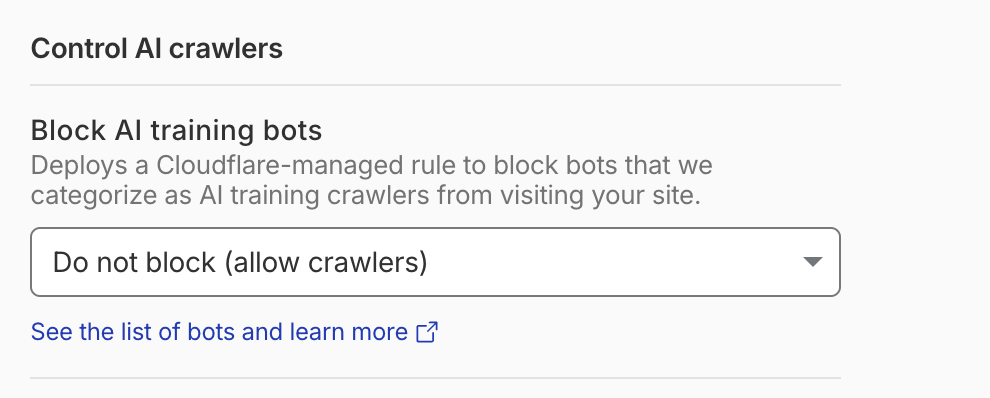
If your site runs on Cloudflare - and roughly 20% of the internet does - there’s a setting under Security > Bots > Block AI training bots that deserves your immediate attention.
In July 2025, Cloudflare made a significant change: blocking AI crawlers became the default for new domains. The intent was to protect publishers from having their content scraped to train AI models without permission or compensation. A reasonable goal.
The problem is the implementation. The default setting doesn’t just block training bots. It blocks all AI crawlers indiscriminately - including the retrieval bots that power ChatGPT Search, Perplexity, and Google AI Overviews.
Those are not the same thing.
A training bot is scraping your content to build a model. A retrieval bot is reading your content so it can recommend you when someone asks a relevant question. Blocking the second one doesn’t protect you. It just makes you invisible.
What Happened When I Flipped It
I set the Block AI training bots setting to “Do not block (allow crawlers)” and left everything else alone.
The referral traffic from ChatGPT started showing up in PostHog. The utm_source=chatgpt.com parameter made it unambiguous - these weren’t people who searched Google and landed on me. These were people who asked an AI a question, got rifts.to as an answer, and clicked through.
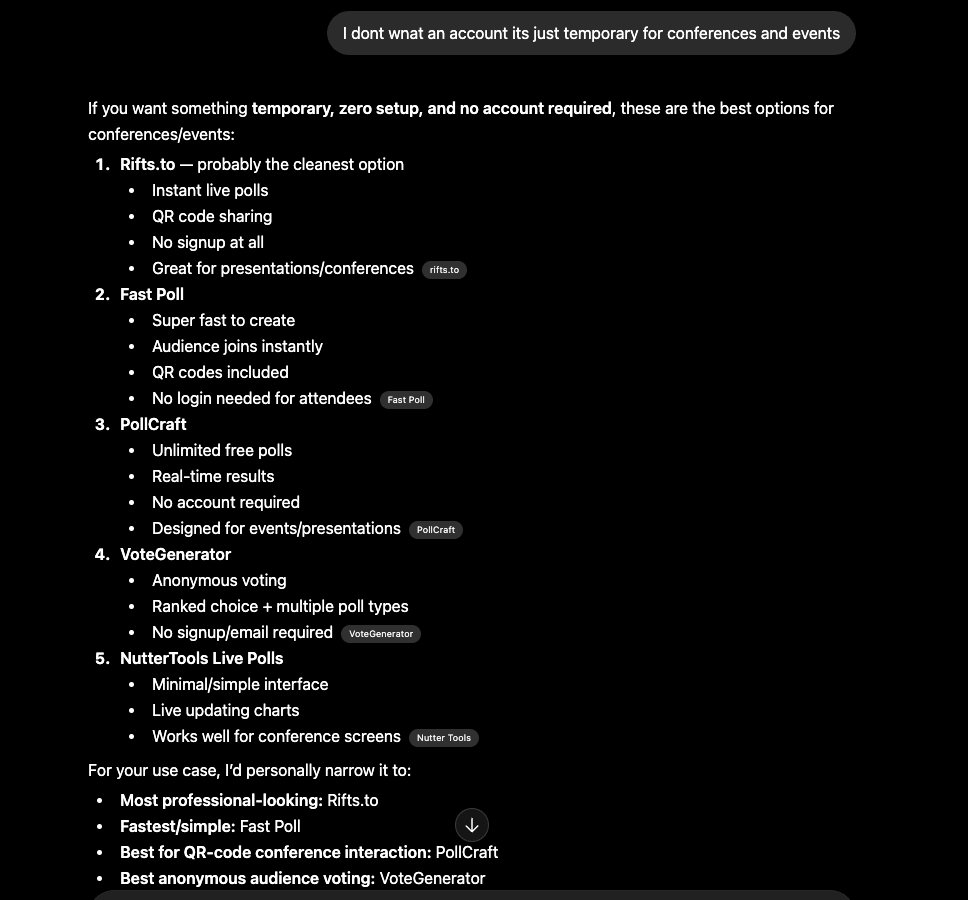
Here’s what that looks like. Someone asked ChatGPT for a temporary polling tool for conferences - no account required. Rifts.to came up first.
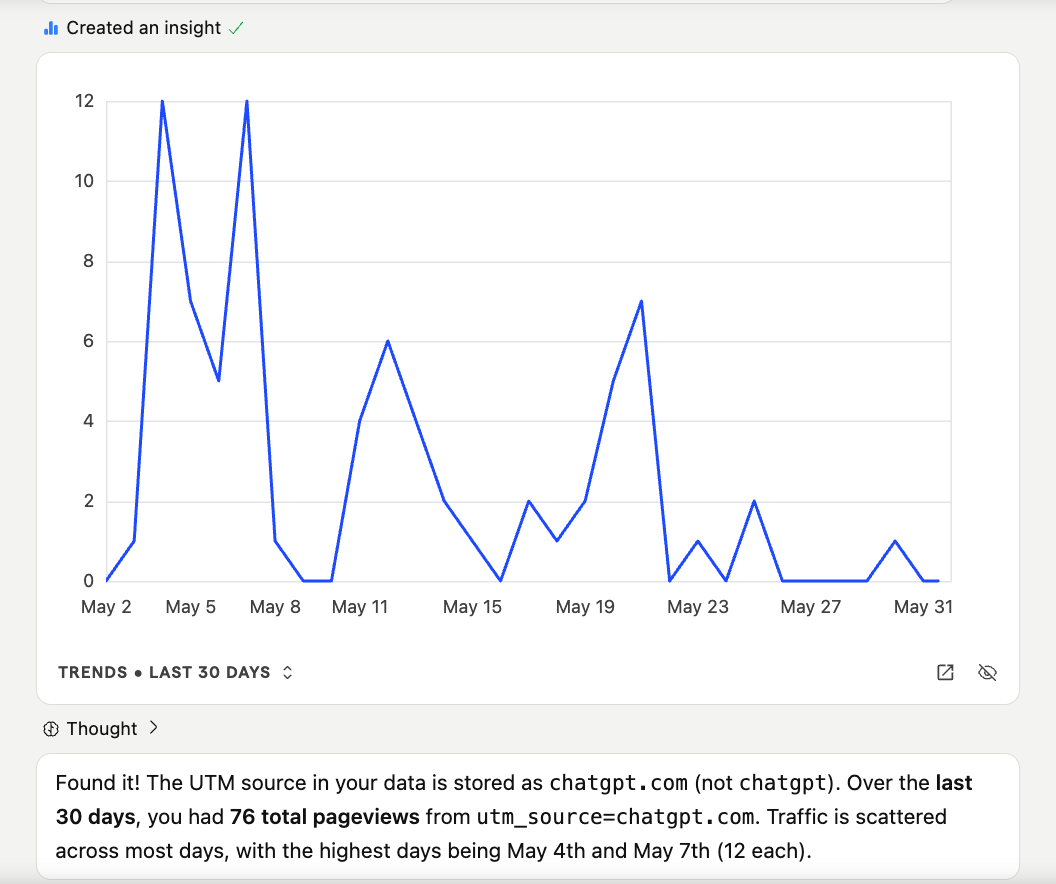
Over the last 30 days: 76 pageviews from ChatGPT. Not a flood. But here’s what those 76 pageviews produced - one of those visitors built a survey on rifts.to that was used by thousands of people across Latin America.
That’s the thing about GEO traffic. It’s not about volume. It’s about intent. When someone asks an AI “what’s a good tool for live polls at a conference” and the AI recommends you, the person clicking through already trusts the recommendation. They’re not browsing. They’re ready to use the thing.
Zero ad spend. One setting change.
The Nuance Worth Understanding
This isn’t “block everything” vs. “allow everything.”
There are two distinct categories of AI crawler:
Training crawlers - bots that scrape your content to build or fine-tune AI models. If you’re worried about your content being used without compensation, these are the ones to think about.
Retrieval crawlers - bots like OpenAI’s OAI-SearchBot and PerplexityBot that read your content so AI can cite and recommend you in answers. Blocking these doesn’t protect your content. It just removes you from the conversation.
Cloudflare’s blanket default blocks both. For most site owners - especially builders who want distribution - that’s the wrong call.
The right move: set Block AI training bots to “Do not block” and use Cloudflare’s per-crawler controls if you want to get more granular about who gets access to what.
Why This Is Still Worth Your Attention
Search behavior is shifting fast. People are asking AI questions and acting on AI answers. The number of touchpoints where your site could get recommended - ChatGPT, Perplexity, Claude, Google AI Overviews, and whatever comes next - is growing.
If your content is blocked from those crawlers, you’re not in those answers. You’re not getting that traffic. You’re not building that brand equity.
The sites that figure this out now are going to have a meaningful advantage over the ones that don’t. Not because GEO is magic, but because the window where most of your competitors are invisible by default won’t stay open forever.
Go check your Cloudflare settings.
Security > Bots > Block AI training bots > Do not block (allow crawlers)
That’s it. Takes thirty seconds.
Being findable is the floor. Everything else is built on top of it.